
Last updated on
Oct 31, 2026

Honda Employment Application free printable template
pdfFiller is not affiliated with any government organization

Fill out
Complete the form online in a simple drag-and-drop editor.

eSign
Add your legally binding signature or send the form for signing.

Share
Share the form via a link, letting anyone fill it out from any device.

Export
Download, print, email, or move the form to your cloud storage.
Why pdfFiller is the best tool for your documents and forms


End-to-end document management
From editing and signing to collaboration and tracking, pdfFiller has everything you need to get your documents done quickly and efficiently.
Accessible from anywhere
pdfFiller is fully cloud-based. This means you can edit, sign, and share documents from anywhere using your computer, smartphone, or tablet.
Secure and compliant
pdfFiller lets you securely manage documents following global laws like ESIGN, CCPA, and GDPR. It's also HIPAA and SOC 2 compliant.
What is Honda Employment Application
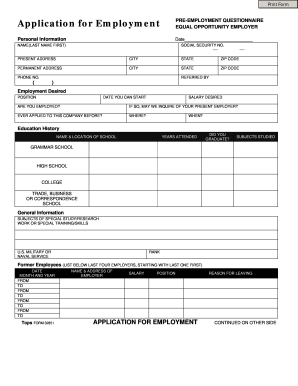
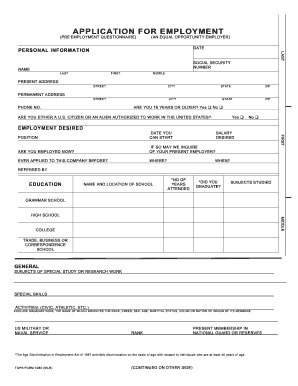
The Application for Employment is a standardized document used by job seekers to formally apply for job positions within an organization.
pdfFiller scores top ratings on review platforms




I like the fact that I only have to change just a few things when I have mailings
I had problems with locating my saved forms due to setting up my account with the wrong email address and the support team was able to help me rectify the matter. thanks
Who needs Honda Employment Application?
Explore how professionals across industries use pdfFiller.

Honda Employment Application is needed by:
-
Job seekers looking for employment opportunities
-
Employers and hiring managers processing applications
-
Human resources personnel in various organizations
-
Recruiters assisting candidates with applications
-
Students and recent graduates entering the job market
Comprehensive Guide to Honda Employment Application
What is the Application for Employment?
The Application for Employment is an essential document for job seekers in the U.S., serving as a means to formally apply for positions within various organizations. Its primary purpose is to collect detailed personal information, work history, and education background from applicants.
This form is commonly used in various contexts, including corporate environments, small businesses, and nonprofit organizations, making it accessible across different industries. The employment application form serves as an integral tool for individuals looking to streamline their job search process.
Purpose and Benefits of Completing the Application for Employment
Providing accurate information through an employment application is crucial for creating a strong impression on potential employers. Utilizing a standardized form not only presents information in a clear format but also ensures that all necessary details are included.
By completing the application for employment, candidates can simplify the hiring process, allowing employers to quickly assess qualifications and fit. This advantage highlights the importance of using a job application template to ensure all relevant fields are addressed.
Key Features of the Application for Employment
The application consists of key sections, including personal information, work history, and references, which are foundational components of the form. It is designed with fillable fields and areas requiring signatures to enhance user convenience.
Unique features, such as the ability to save and edit the document in an employment application PDF format, allow for greater flexibility in completing the form accurately and efficiently. Applicants can expect a user-friendly experience that aids in the application process.
Who Needs the Application for Employment?
This form is essential for various individuals, including first-time job seekers and seasoned professionals across numerous industries. Understanding who requires this application can help clarify misconceptions; virtually anyone applying for a job in the U.S. will need to complete this form.
Importantly, the application for employment is not limited to entry-level positions; even those with extensive work experience must submit this information. The understanding of its widespread necessity can help alleviate concerns among applicants.
How to Fill Out the Application for Employment Online
Filling out the application online can be a straightforward process when using a tool like pdfFiller. Follow these steps to ensure comprehensive completion:
-
Access the application for employment form.
-
Complete personal details, including your name and contact information.
-
Fill in your employment history, detailing previous positions held.
-
Provide professional references who can vouch for your qualifications.
To ensure accuracy, double-check all entered information against your documents and use the provided tips for thoroughness.
Review and Validation Checklist for the Application for Employment
Before submitting your application, it's essential to conduct a thorough review. Consider the following key items:
-
Confirm all sections are fully completed.
-
Check for spelling and grammatical errors.
-
Ensure that dates of employment are accurate and formatted correctly.
-
Verify that all references consent to being contacted.
Awareness of common errors, such as missing signatures or incomplete sections, can help applicants avoid mistakes that could delay the hiring process.
How to Sign the Application for Employment
The signing process for the application can differ based on the method of submission. A digital signature is often acceptable for online applications, while a wet signature may be required for printed submissions.
Signing the application signifies that the applicant certifies the accuracy of the information provided, underscoring the importance of honesty during the application process.
Submission Methods and Delivery for the Application for Employment
There are several methods to submit the application form, including online submissions, in-person delivery, and email options. Each method may have associated deadlines or requirements, which applicants should be aware of as they finalize their documents.
-
Online submission through the employer’s portal.
-
In-person delivery at the company's human resources department.
-
Emailing the completed form to the hiring manager.
Applicants should also inquire about confirmation of submission or any tracking options available if submitting electronically.
Security and Compliance When Submitting the Application for Employment
When submitting personal information, applicants can be assured of security measures in place to protect sensitive data. Compliance with regulations such as HIPAA and GDPR ensures that user information is managed responsibly and ethically.
Utilizing platforms like pdfFiller, which features robust security capabilities, further reassures applicants that their data is safeguarded throughout the submission process.
Enhance Your Job Application Experience with pdfFiller
pdfFiller provides an intuitive platform for completing and managing employment applications with ease. Users can take advantage of features such as eSigning and document organization, making the job application experience much more efficient.
With a focus on usability, pdfFiller empowers applicants to feel confident in their ability to create and submit professional applications, ultimately enhancing their prospects in the job search.
How to fill out the Honda Employment Application
-
1.Begin by accessing the Application for Employment form on pdfFiller's website. You can find it by searching for the form's title in the search bar.
-
2.Once opened, familiarize yourself with the layout of the form. pdfFiller presents fields that you need to fill out along with instructions to guide you.
-
3.Before filling out the form, gather essential information such as your name, address, work history, educational background, and references to streamline the completion process.
-
4.Navigate through the form, clicking on each field to input your information. Make sure to enter details such as your name, contact information, and job history accurately.
-
5.Pay attention to sections requiring checkboxes or specific formatting, following prompts to ensure adherence to the form's requirements.
-
6.After completing all sections, review each entry carefully to eliminate any errors or omissions, ensuring the accuracy of your information.
-
7.Once satisfied with your input, save your progress by clicking the save icon. This allows you to revisit the form if necessary.
-
8.You can download the filled form as a PDF by selecting the download option. Alternatively, submit it directly to your prospective employer using the submission feature in pdfFiller.

Who is eligible to fill out the Application for Employment?
Anyone seeking employment opportunities within organizations can fill out the Application for Employment, regardless of experience level.
Are there deadlines for submitting the Application for Employment?
While the application itself does not have a universal deadline, it is advisable to check the specific timelines set by individual employers for applications.
How do I submit the Application for Employment once filled out?
You can submit the Application for Employment directly through pdfFiller by using the submission feature or download it and send it to the employer via email.
What supporting documents are required with the Application for Employment?
Typically, you may need to provide a resume, cover letter, and references along with the Application for Employment, but check with the employer for specific requirements.
What common mistakes should I avoid when filling out the form?
Common mistakes include typos, entering incorrect or inconsistent information, and neglecting to complete all required fields on the Application for Employment.
How long does it take to process the Application for Employment?
Processing times vary by employer. Generally, candidates can expect to hear back within a week or two of submission, but some may take longer.
Is notarization required for the Application for Employment?
No, notarization is not required for submitting the Application for Employment as the document's verification is typically handled by the employer.
Related Content
Related Forms




Related Catalogs
Get the latest insights from our blog


If you believe that this page should be taken down, please follow our DMCA take down process
here
.
This form may include fields for payment information. Data entered in these fields is not covered by PCI DSS compliance.